Remember when we play this tape video games? haha. Here is the rebirth of those 2D games which can be played in PC, Play Station and many more.
Drifters of this world are the collectors of forgotten knowledge, lost technologies and broken histories. Our Drifter is haunted by an insatiable illness, traveling further into the lands of Buried Time, steeped in blood and treasure hoping to discover a way to quiet the vicious disease. Echoes of a dark and violent past from the dead eras resonate throughout and he can't help but listen.
The hero.
The game.
Hyper Light Drifter is a 2D Action RPG in the vein of the best 8-bit and 16-bit classics, with modernized mechanics and designs on a much grander scale.
Visions for this game have been fluttering in my skull for ages; something dark and fantastic, with giant forests to navigate, huge floating structures to explore, deep crumbling ruins to loot, massive throngs of enemies to rend, and behemoths both flesh and mechanical to overcome. I want it all to be as beautiful as possible, forging color with the dark and eerie wastes and intimidating landscapes. It plays like the best parts of A Link to the Past and Diablo, evolved: lightning fast combat, more mobility, an array of tactical options, more numerous and intelligent enemies, and a larger world with a twisted past to do it all in.
More.
Wednesday, October 9, 2013
Wednesday, October 2, 2013
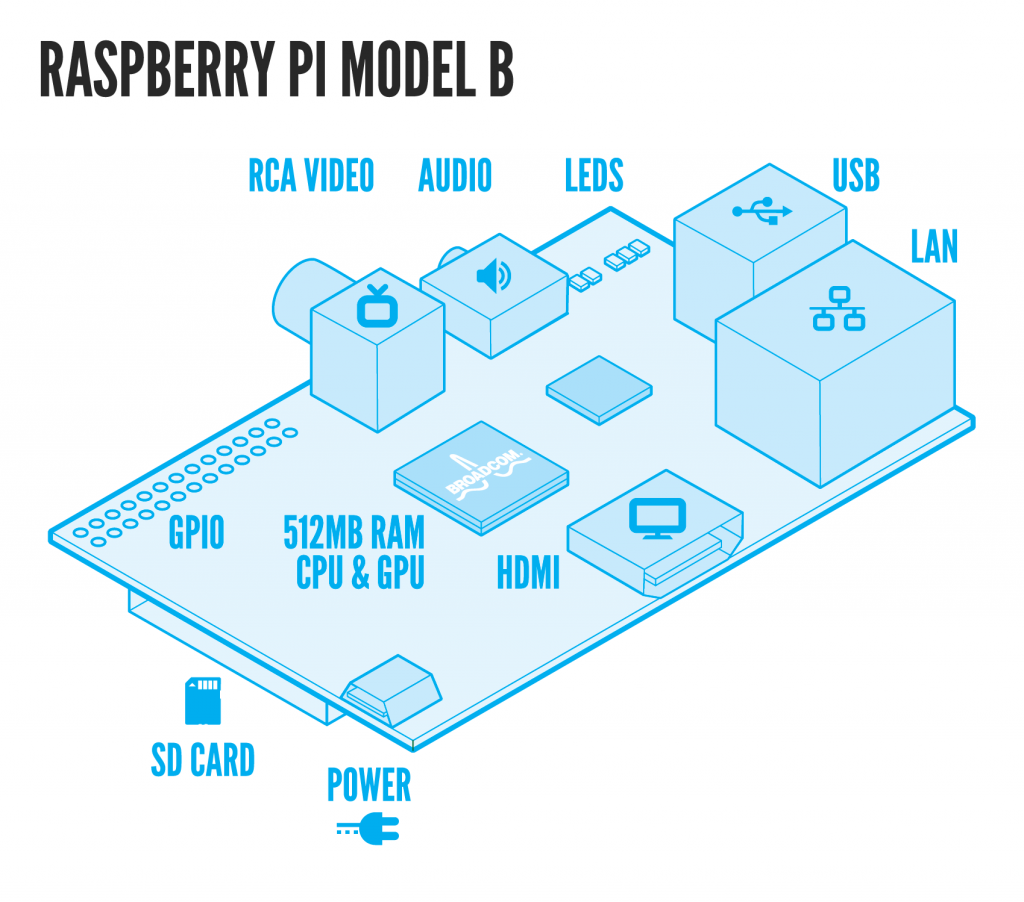
Raspberry Pi
Developed by The Raspberry Pi Foundation.
Here are the FAQ on this device.
What’s a Raspberry Pi?
The Raspberry Pi is a credit-card sized computer that plugs into your TV and a keyboard. It’s a capable little PC which can be used for many of the things that your desktop PC does, like spreadsheets, word-processing and games. It also plays high-definition video. We want to see it being used by kids all over the world to learn programming.
Can I buy shares in the Raspberry Pi Foundation?
We’re a charity, so you can’t buy shares in the company. If you want to support us, we’d love you to buy one.
BUYING AND SHIPPING
Where can I buy one?
You can buy the Raspberry Pi through Premier Farnell/Element 14 and RS Components. Both distributors sell all over the world.
In mainland China, Taiwan, Hong Kong and Macau you can also buy directly through Egoman Technology Corp.
How many can I buy in one go?
We’ve lifted the one-per-person restriction: you can buy as many as you want.
How much will it cost?
The Model A will cost $25 and the Model B $35, plus local taxes and shipping/handling fees.
What will I get when I buy one?
You will get the Raspberry Pi Board itself. A power supply or SD cards are not included but can be purchased at the same time from Farnell and RS. You will be able to buy preloaded SD cards too.
Why is the price in US Dollars? You’re a UK company!
The components we buy are priced in dollars, and we negotiate manufacturing in dollars. Because currency markets are so volatile at the moment, we price the final board in dollars too so we don’t have to keep changing the price.
Wednesday, October 24, 2012
How To Download Driver Update/Update Patches Manually For Windows 7
If you want to download Windows 7 updates, you can manually download it from Microsoft Update Catalog. There are some printer drivers that are built in by Windows 7. Just type at search box in Microsoft Update Catalog.
Click Add. Then go to basket and download it.
Sunday, September 9, 2012
How To Reset Local User Account Password Windows XP, Vista or 7
All you need is just a USB stick. Can also use CD but its kind of waste because the file size is not more than 10MB. First download the boot file. USB. CD. Floopy(this is super old-school). If using floppy you might need this drivers. PATA/SATA. SCSI.
The CD will boot with most BIOSes, see your manual on how to set it to boot from CD. Some will auto-boot when a CD is in the drive, some others will show a boot-menu when you press ESC or F10/F12 when it probes the disks, some may need to have the boot order adjusted in setup.
Copy all the files that is inside the usbXXXXXX.zip or on the CD
onto an usb drive, directly on the drive, not inside any directory/folder.
It is OK if there are other files on the USB drive from before,
they will not be removed.
Install bootloader on the USB drive, from command prompt in
windows (start the command line with "run as administrator" if possible)
Replace X: with the drive letter the USB drive shows up as (DO NOT USE C:)
If it seems like nothing happened, it is usually done.
However, a file named ldlinux.sys may appear on the USB drive, that is normal.
It should now in theory be bootable.
Please know that getting some computers to boot from USB is worse
than from CD, you may have to change settings, or some will not
simply work at all. If using Windows 7 please run CMD as administrator.
After that boot from you respective device and follow simple instruction.
credit to http://pogostick.net.
How to make the CD
Unzipped, there should be an ISO image file (cd??????.iso). This can be burned to CD using whatever burner program you like, most support writing ISO-images. Often double-clikcing on it in explorer will pop up the program offering to write the image to CD. Once written the CD should only contain some files like "initrd.gz", "vmlinuz" and some others. If it contains the image file "cd??????.iso" you didn't burn the image but instead added the file to a CD. I cannot help with this, please consult you CD-software manual or friends.The CD will boot with most BIOSes, see your manual on how to set it to boot from CD. Some will auto-boot when a CD is in the drive, some others will show a boot-menu when you press ESC or F10/F12 when it probes the disks, some may need to have the boot order adjusted in setup.
How to make an bootable USB drive
X:syslinux.exe -ma X:
How to make the floppy
The unzipped image (bdxxxxxx.bin) is a block-to-block representation of the actual floppy, and the file cannot simply be copied to the floppy. Special tools must be used to write it block by block.- Unzip the bd zip file to a folder of your choice.
- There should be 3 files: bdxxxxxx.bin (the floppy image) and rawrite2.exe (the image writing program), and install.bat which uses rawrite2 to write the .bin file to floppy.
- Insert a floppy in drive A: NOTE: It will lose all previous data!
- Run (doubleclick) install.bat and follow the on-screen instructions.
- Thanks to Christopher Geoghegan for the install.bat file (some of it ripped from memtest86 however)
dd if=bd??????.bin of=/dev/fd0 bs=18kAfter that boot from you respective device and follow simple instruction.
credit to http://pogostick.net.
Wednesday, July 18, 2012
How to Open Samba from Windows
Just now having problem with my Endian running Samba. My Windows 7 cannot open the file in Samba. After doing this below steps, still not working.
Control Panel - Administrative Tools - Local Security Policy
Local Policies - Security Options
Network security: LAN Manager authentication level
Send LM & NTLM responses
Minimum session security for NTLM SSP
Disable Require 128-bit encryption
Also try
comment out
valid users = %S
in Samba config file.
Also cannot. In the end of the day its just basic network.
After adding my computer's ip subnet into the interface in Samba config file.
host allow = 192.168.1.
Finally can open only it prompt password. So i put root as username and the password.
Thursday, July 5, 2012
Official NIKE Ball for English Premier League 2012/13
New Features
The ball is now more responsive to a players touch and also has a 360 sweet spot, which should make it easier for players to strike the ball, causing havoc for Premier League goalkeepers.
Nike went to extensive lengths to test their new ball before unveiling it to the world.
The ball is now more responsive to a players touch and also has a 360 sweet spot, which should make it easier for players to strike the ball, causing havoc for Premier League goalkeepers.
Nike went to extensive lengths to test their new ball before unveiling it to the world.
Thursday, May 31, 2012
HP Deskjet 5440 Series Driver for Windows 7
In order to makes your Windows 7 can use HP Deskjet 5440, update you Windows 7. The driver for this printer is bundled in Windows update. Refer to image below.
Once finished installing the update, you can print using HP Deskjet 5440.
Subscribe to:
Posts (Atom)